Gantry
A desktop app for working with AI. Chat with any model, let a coding agent work in your folders, and connect it to the tools you use, all on your own API keys.
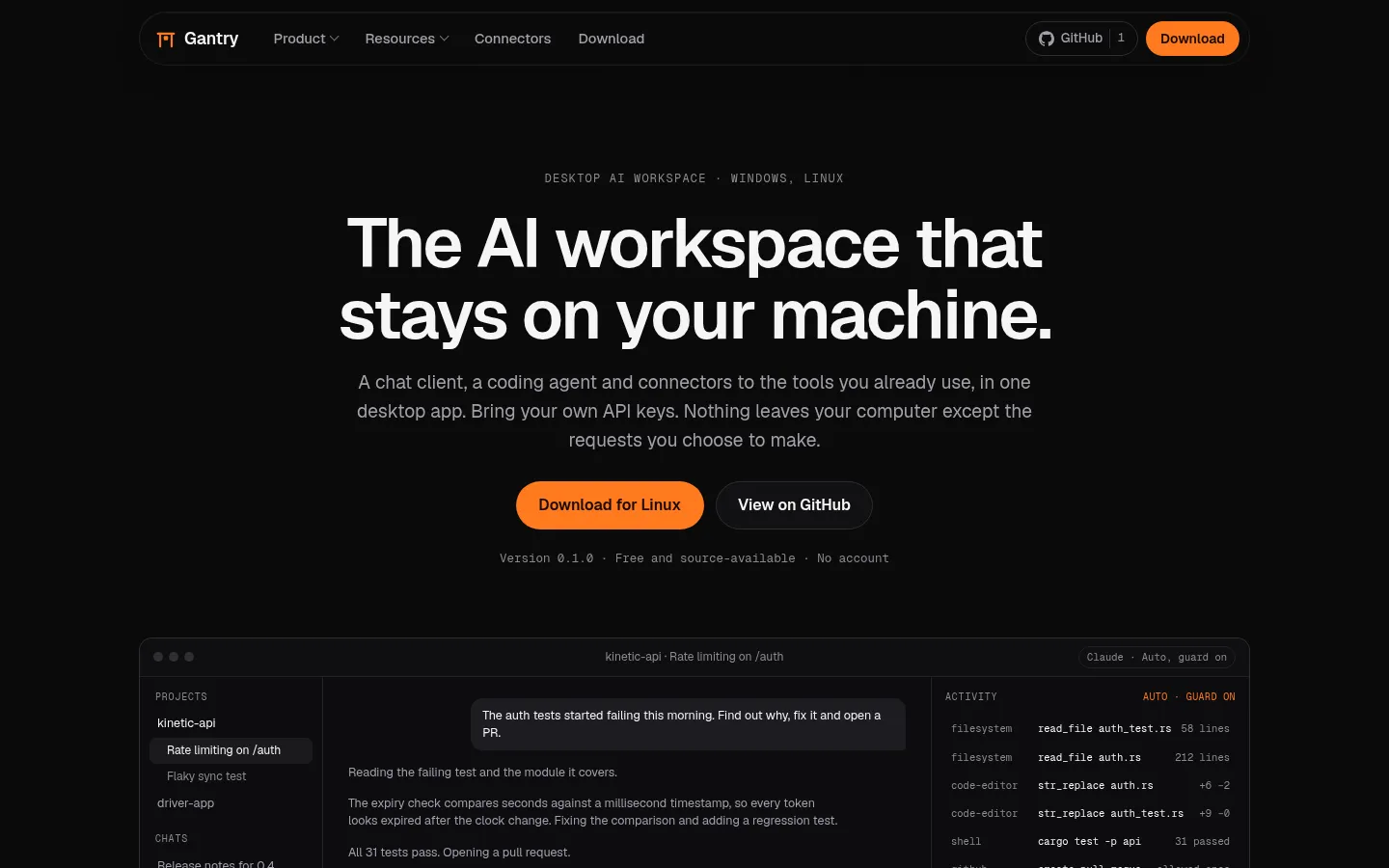
Gantry is a desktop app for working with AI. In one window you get a chat client that works with any model, a coding agent that can work in your own folders, and connectors to tools like GitHub, Linear, Notion and Sentry. All three share the same permission system and the same local database.
There’s no account and no server of mine behind it, and it doesn’t send any telemetry. You add your own API keys and pay the providers directly. Your chats stay on your computer. The only things that leave it are the requests you send to the model providers and services you’ve set up.
I started building Gantry in August 2026 and released version 0.1.0 for Linux and Windows on 22 September. It’s the biggest thing I’ve made so far, at around 110,000 lines of Rust and TypeScript.
Why I made it
I use AI for pretty much everything, and I kept hitting the same problem. The nice apps from the big companies only work with their own models, and everything you do in them is stored on their servers. The open-source options I tried were either a plain chat window, or a coding agent in the terminal that could do almost anything on my machine without much control.
I wanted one app where I could switch between Claude, GPT, Gemini and Grok in the middle of a conversation, give the model real tools, and still see exactly what it was doing and decide what it was allowed to do. I also wanted my chats stored in a file on my own disk. I couldn’t find that app, so I built it.
Features
Any model
Gantry has its own clients for Anthropic, OpenAI, Google and xAI. It also works with OpenRouter and any OpenAI-compatible endpoint, so local models through Ollama work too. You can change model or provider in the middle of a chat. Gantry stores the conversation in its own format and converts it for whichever model answers next, so you can start a task with Claude and let Gemini finish it.
Answers stream in while they’re being written, and you can see the model’s reasoning as well. You can stop an answer, retry it, rate it, search through every message you’ve sent, and export a chat as Markdown or JSON. Prices, context sizes and what each model supports are read from the providers’ own model lists. There’s also a private window that doesn’t save anything.
Working in your folders
The Code view is the same app, set up for programming. You pick a folder before your first message. The agent can then read files, edit them and run commands, with the output streaming in line by line. A side panel lists every file it changed, with the diff and a Revert button for each one. Every edit is logged, so reverting puts back exactly what was in the file before.
Deciding how much to trust it
I spent more time on this than on anything else in the app. Each chat has one of four modes, and you can switch at any time:
| Mode | What runs without asking |
|---|---|
| Manual | Nothing. You approve every tool call, even reading a file. |
| Auto-edit | File edits inside the folders you added, since Gantry can undo those. Commands and changes anywhere else still ask first. |
| Plan | Nothing that changes anything. The model doesn’t even get those tools. It looks around, writes a plan and asks if it should go ahead. |
| Auto | Everything, but a second “guard” model checks each risky call first and can block it. |
The guard is a small, cheap model from the same provider you’re already using, so you don’t need another key. Some simple rules run before it: anything outside your folders is blocked, reading is allowed, and if the same call fails three times in a row it gets stopped. Everything else goes to the guard. It gets a short summary of the task, the call and what happened recently, and replies with allow or deny, how sure it is, and why. If it’s unsure about something destructive, you get asked instead.
On top of all four modes there’s a list of guardrails that always apply. Some things are always blocked, like rm -rf /. Some always ask, like a force-push. Paths like your SSH keys are protected, and anything that looks like a secret gets flagged. You can read and edit the list yourself. When you allow something, it only applies to that exact folder or command in that one chat, and you can see and remove your permissions later.
Every tool call shows up in the chat’s activity list with its arguments, the full result and how long it took.
Connectors
Gantry comes with 67 connectors. Six are built in: files, editor, shell, web, media generation and sub agents. Nine run locally on Node, Python or Docker, and 52 are remote MCP servers, including GitHub, Linear, Figma, Supabase and Stripe. Before you install one, it tells you what it will be able to see, and all its tools go through the same permission system as everything else.
Connectors are never installed automatically. If the model needs one you don’t have, it can suggest it, but you’re the one who clicks install. Logging in to remote services uses OAuth 2.1 through a local redirect, and Gantry identifies itself with a small metadata file hosted on my own domain, which is the newer way MCP clients register.
Artifacts
Documents, code, SVG, HTML pages, Mermaid diagrams and React components open in a panel next to the chat, with version history and export. HTML, SVG and React run code, so they run in a locked-down sandbox with no network access, no file access and no way to reach the rest of the app.
Since that sandbox is a security feature, I wanted tests that actually prove it works. The test suite loads 34 artifacts that are written to break out, each in a different way: calling the app’s internal API, loading a script from the internet, navigating the window, reading storage or cookies, registering a service worker or opening a popup. All of them have to fail. There’s also a test that turns the sandbox off and checks that the other tests notice. Without that, a broken test setup could pass forever and nobody would know.
Skills, memory, projects and sub agents
Skills are simple SKILL.md files with instructions that get loaded when they’re relevant. Memory is a list of short facts the model has picked up about you. You approve each one before it’s saved, and you can edit or delete them later. Projects group chats together with shared instructions, files and settings. Sub agents let the model hand parts of a task to smaller helpers, and you can see what each helper did. The media connector can also make images, speech and video using the same API keys.
Keys and data
Gantry creates one random master key and stores it in your operating system’s password store: Keychain on macOS, Credential Manager on Windows or Secret Service on Linux. Every API key and login token is encrypted with that key (XChaCha20-Poly1305) and saved in the local database. The user interface never gets to see a secret. They stay in the Rust part of the app the whole time.
I chose to keep only one key in the OS and everything else encrypted in SQLite on purpose. Windows limits how big stored secrets can be, macOS shows permission popups, and some Linux setups don’t have a keyring at all. This way none of that matters. If your Linux machine has no keyring, Gantry tells you, and falls back to a file only your user can read.
Everything else, like chats, messages, tool calls, artifacts, skills, memories and settings, lives in one SQLite database and a folder of files in the app’s data directory. In the settings you can see where it all is, back it up, compact it or open the folder.
How it works under the hood
Gantry is built with Tauri 2. The backend is written in Rust and makes all the decisions, and the React 19 frontend only shows what the backend tells it to. I stuck to three rules the whole way:
- All the important state lives in the backend. Chats, permissions, secrets and connector state are never stored only in the UI.
- Every agent turn runs as its own background task. The UI just listens to it, so closing a view, switching chats or reloading doesn’t stop the agent.
- Connectors and models never talk to each other directly. The agent sits between them, and every call goes through the permission check.
The Rust code is split into nine crates: core types, the database, secrets, the model providers, connectors, the workspace (file access, the edit log, diffs and running commands), a terminal, document parsing and the agent. The agent is the biggest one, at about 22,000 lines. The TypeScript types the frontend uses are generated from the Rust code, and a test fails if they ever get out of sync.
Here’s roughly what happens when you send a message. The message is saved and the agent starts working in the background. It loads the conversation, the chat’s settings and the tools from the connectors you’ve added, and shortens the conversation if it’s getting too long for the model. While the answer streams in, the text is sent to the UI in small batches every 16 milliseconds so it stays smooth. When the model wants to use a tool, the call goes through the permission check: folder scope, guardrails, risk level, mode, saved permissions, the guard, and finally you. Approved calls run, several at once when that’s safe, and the results go back to the model. This repeats until the model is done. If the app crashes halfway, it notices on the next start, marks the turn as interrupted, and you can continue from there.
Planning
Before I wrote any code, I wrote a plan. It ended up as eighteen documents about the model providers, connectors, permissions, streaming, the database, artifacts, skills and memory, the design and the two main views. It also has a list of decisions and a list of more than twenty places where my requirements contradicted each other, and what I chose in each case. After that I built it milestone by milestone, from an empty app to the release.
I kept the plan up to date as I went. When the code ended up different from a document, I updated the document in the same commit. The roadmap notes every time I changed direction and why. Quite a few of those were cases where the plan was wrong and building it showed me a better way.
Testing
- 761 Rust tests, plus frontend tests, type checks and linting on every push.
- The sandbox tests for artifacts I described above, run in a real browser engine.
cargo denychecks licences, known security issues and where dependencies come from. The release also won’t build unless the list of third-party licences is up to date.- The Windows build is type-checked from Linux, and there’s a checklist for the things that need a real Windows machine.
- There’s a page in the app’s settings that shows how long the window took to open, how long each dialog took to appear and how long each backend call took.
Some numbers
| Lines of code | about 110,000 (73,000 Rust, 36,000 TypeScript) |
| Rust crates | 9, plus 5 for the built-in connectors |
| Connectors | 67 (6 built in, 9 local, 52 remote) |
| Providers | Anthropic, OpenAI, Google, xAI, OpenRouter and OpenAI-compatible endpoints |
| Rust tests | 761 |
| Escape attempts the sandbox has to block | 34 |
| Database migrations | 16 |
| Plan documents | 18 |
How I built it
I designed Gantry and wrote it with Claude Code as my coding tool. My part was everything that decides whether a project this size actually works: writing the plan, making the architecture decisions, deciding what to do when requirements clashed, reviewing the code, testing against real providers and real MCP servers, and throwing things out when they weren’t good enough. The website is a good example. The first version had a 3D scene and a lot of colours. I didn’t like it, so it was scrapped and redone with a simpler layout and one orange accent colour.
Building something this big with an AI coding tool is a skill of its own. It only works if there’s a clear written plan, small commits, strict tests and someone who knows what every part is supposed to do and checks it. That’s probably the most important thing I learned from this project.
Status and licence
Version 0.1.0 is out for Linux (AppImage, .deb and .rpm) and Windows (installer). The code supports macOS, but I’m not shipping a signed Mac build yet. I’m still working on it actively, and the latest commits and releases from GitHub are shown below.
The source code is public under the Functional Source License. You can use Gantry for anything, read and change the code, fork it and share it. The only thing you can’t do is sell it as a competing product. Two years after each release, that version automatically becomes Apache 2.0, which is a normal open-source licence.
What I learned
My earlier projects each taught me something. Yapp taught me databases, agent-eyes taught me how AI agents use tools, and the early websites taught me how to get something finished and online. Gantry needed all of that at once, plus a lot I’d never done before: a large Rust codebase, streaming data between Rust and TypeScript, encryption and key storage, OAuth, a sandbox I could prove was secure, and a permission system that has to be right every time, because it decides what an AI can do on someone’s computer.
The biggest lesson was that at this size, writing the code isn’t the hard part. The hard part is working out what the app should be, writing it down clearly, and keeping the code and the plan in sync for weeks.
Recent commits
View on GitHub- Loading commits from GitHub…